
By Anurag Anant Mishra — MarTech Architect
The short version
Plenty of people are now writing about how to get cited by AI. Far fewer talk about how you would even know if it worked. That gap bothered me, so I spent a few months measuring it on my own site and writing down what each tool actually tells you — and what it quietly doesn't.
Everything below comes from real reports on my own domain, including the numbers.
The three tools that matter
No single dashboard gives you the full picture. Three overlap, each covering a different part:
- Bing Webmaster Tools — AI Performance. Citation counts sourced from Microsoft Copilot and partners, with a page-level breakdown of which of your URLs were cited.
- Google Search Console — Generative AI features. Impressions in Google's AI surfaces, broken down by page, country and device.
- Microsoft Clarity — AI Visibility. Draws on the same Microsoft source as Bing Webmaster Tools, plus a Share of Authority figure, AI referral traffic, and — the part that turns out to matter most — a breakdown of your citations by branded versus non-branded queries.
Because Clarity and Bing Webmaster Tools share a source, their citation numbers agree. Bing Webmaster Tools tells you which page got cited. Clarity tells you what kind of query got you there. You want both.
The numbers from my site
Concrete beats abstract, so here is what I actually see.
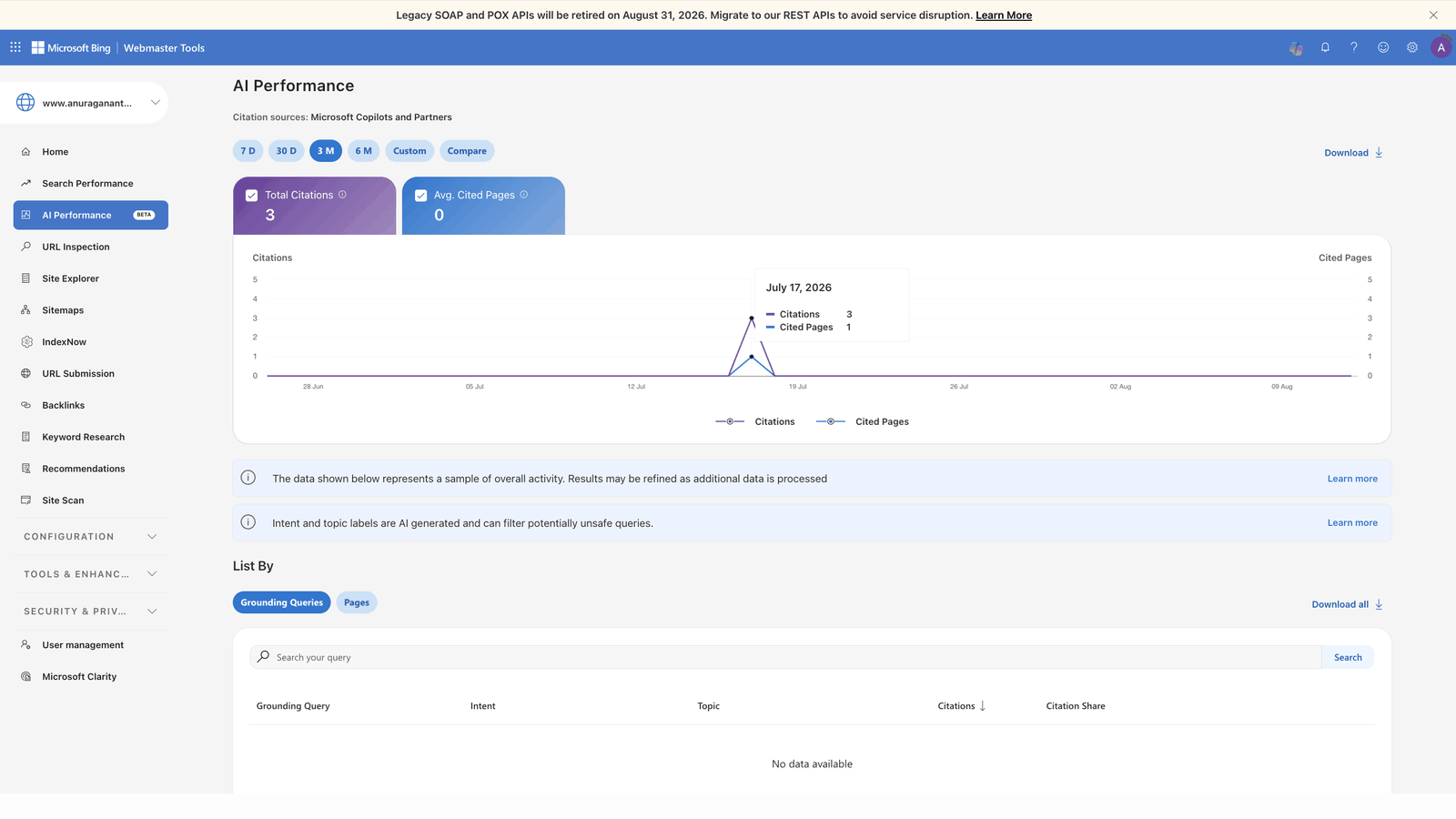
Bing Webmaster Tools: 3 total citations over three months, all attributed to my home page — though as I explain below, I can't rule out that some of those came from my own testing.
Search Console, Generative AI features: 20 total impressions over three months, broken down by page:
- Home page — 11
- Consent Mode v2 article — 5
- About page — 4
- AI crawlers article — 3
- Tag governance article — 1
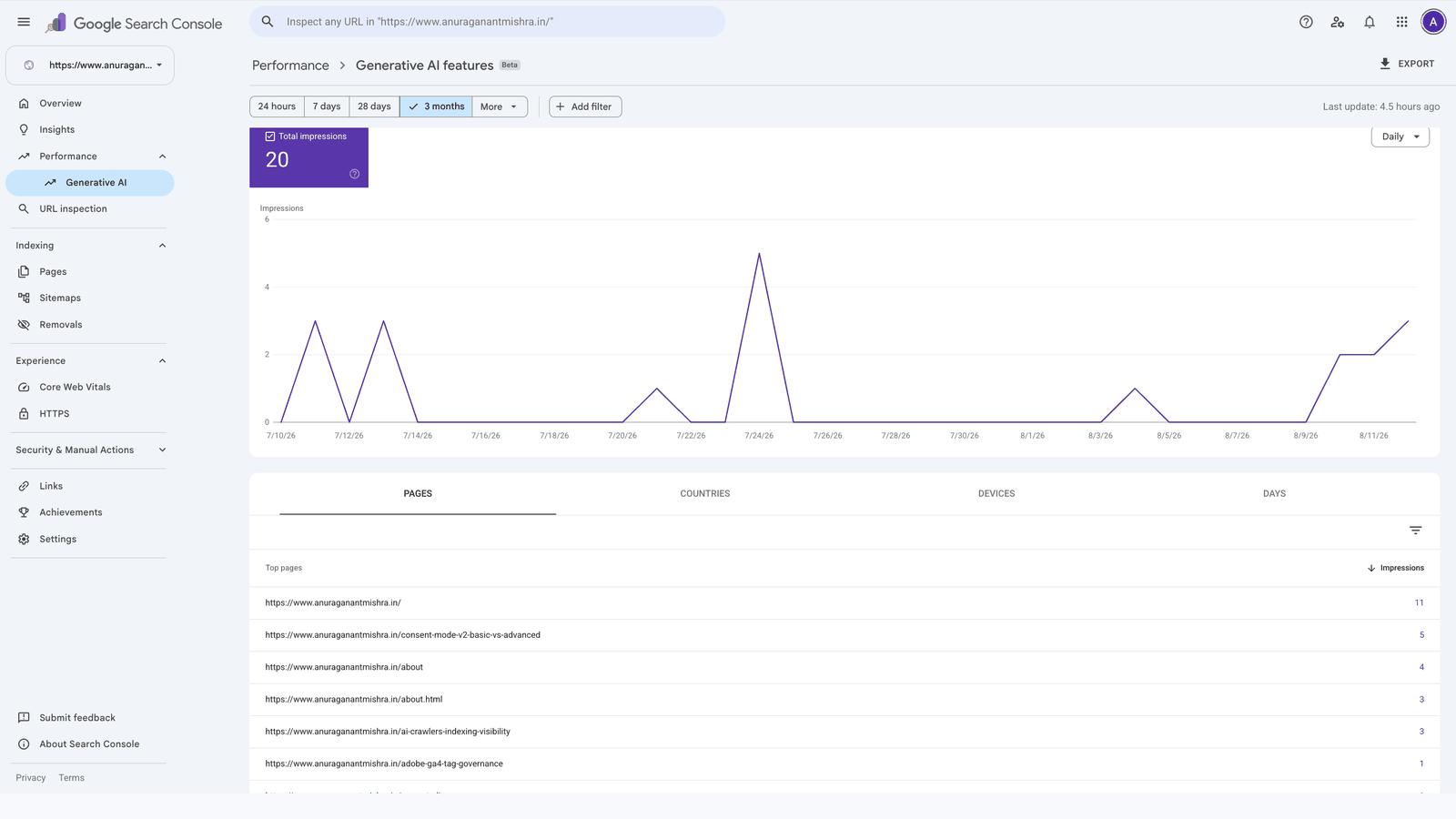
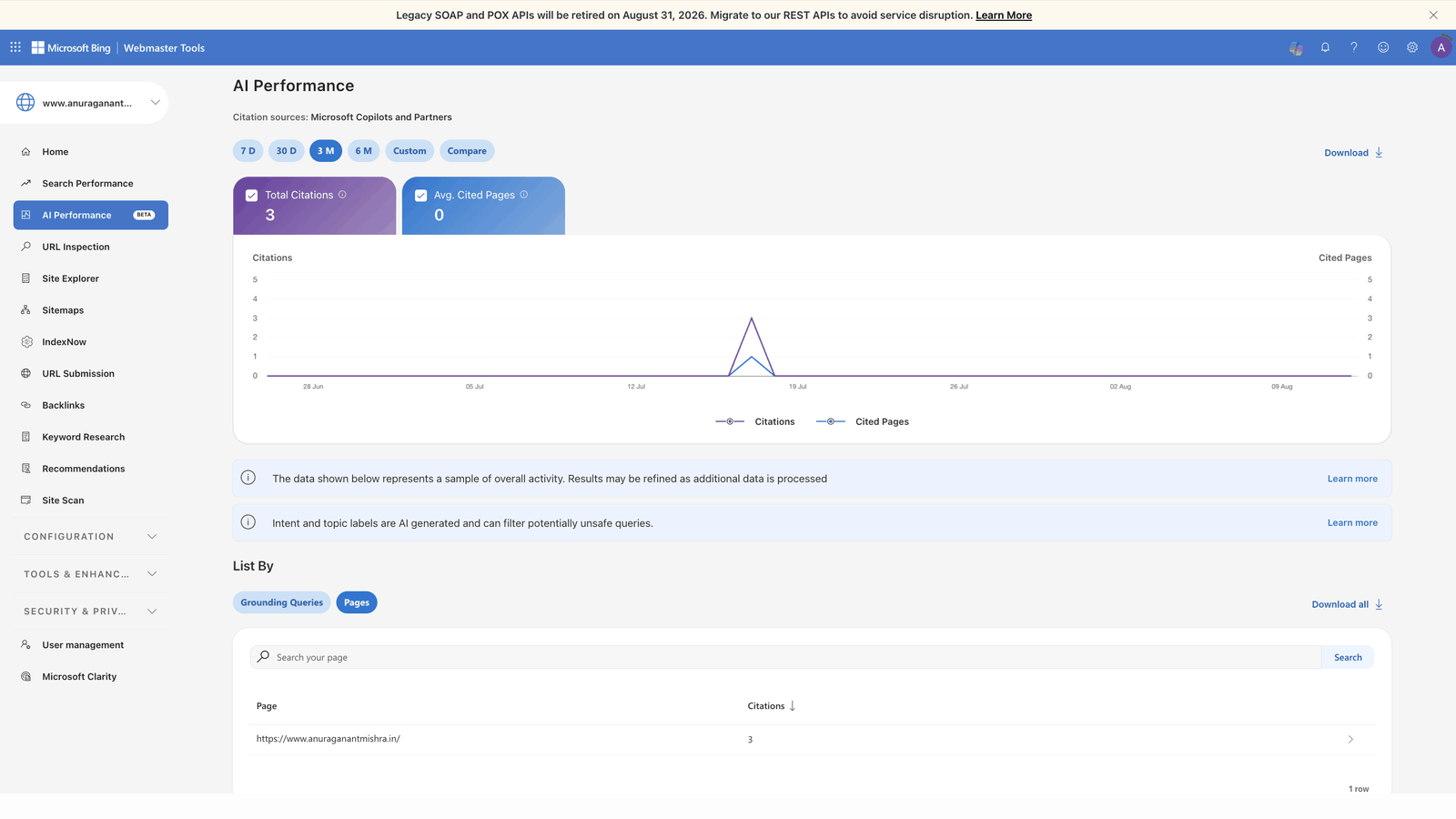
These are small numbers, and I am showing them deliberately. This is what early traction on a new domain looks like. Anyone promising you dramatic AI visibility in week one is selling something.
One caveat you will notice if you add those figures up: the per-page numbers sum to more than the reported total of 20. The report is still in Beta, and its own documentation notes that data is processed with a delay and may be refined. So treat these as directional rather than exact — even the tool's own totals don't reconcile with its own breakdown yet.
One pattern is still worth noting: my Consent Mode article leads the article pages. It is the most specific, most practical thing I have written. That is not a coincidence.
The surprise: Google and Bing move at completely different speeds
This caught me off guard more than anything else. Google indexed my new articles within about 24 hours. Bing took more than two weeks for the same pages, submitted the same way — including IndexNow pings, which are supposed to be Bing's fast lane.
Gemini is quick to index and quick to start surfacing and citing pages. Bing is simply slower, and Copilot inherits that lag. So if you publish and check Copilot two days later and see nothing, do not conclude your setup is broken. Check the index status first, and give Bing weeks rather than days.
What a citation actually looks like
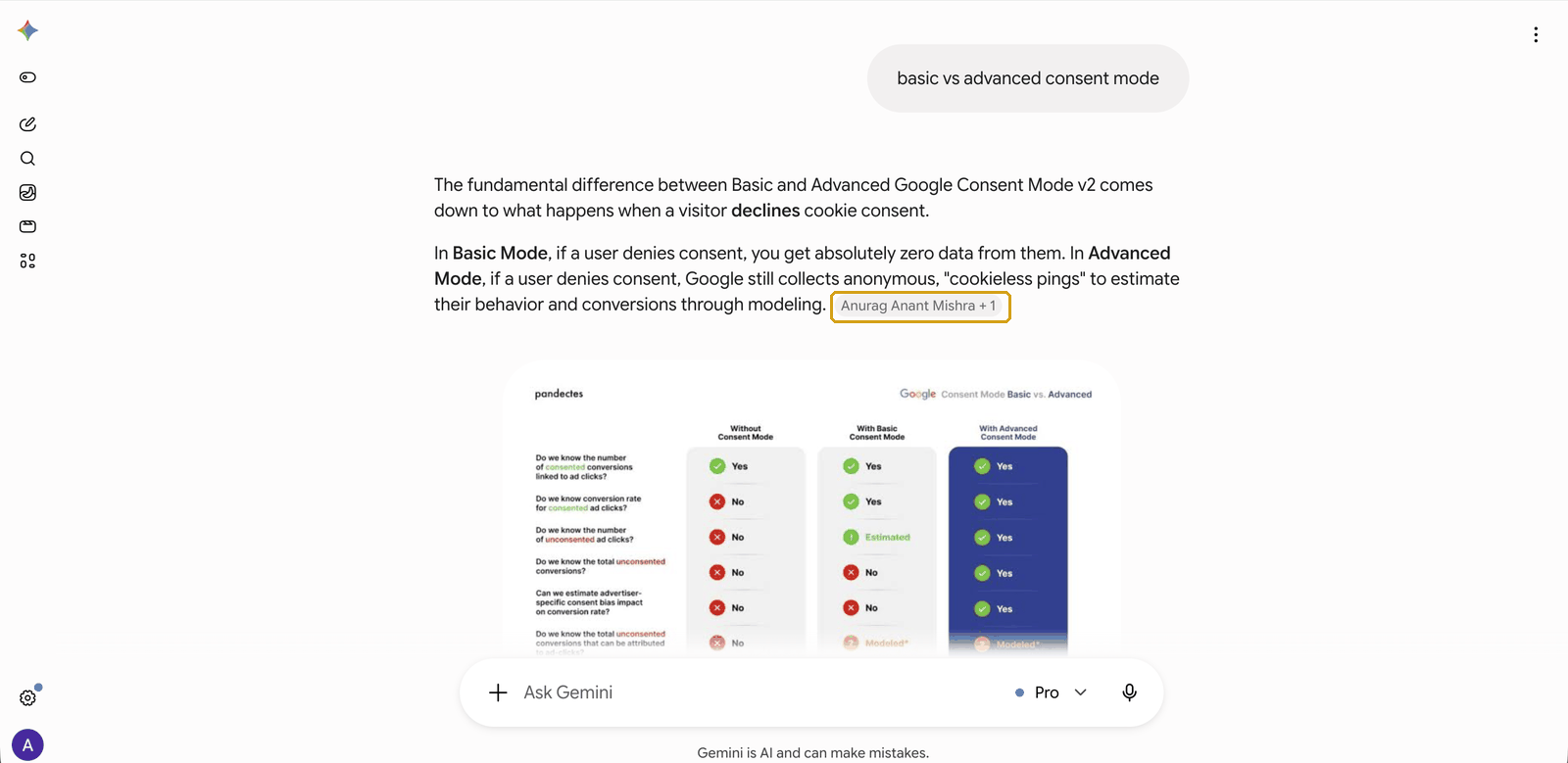
Dashboards give you counts. They don't show you the thing itself. So here are both forms I've seen, from queries I ran myself — which means they demonstrate capability, not traffic. Both queries were non-branded: no name, no domain, just the topic.
The first is a direct citation. I asked Gemini a plain competitive question, and it answered using my article, with an attribution chip naming me as the source:
The second is weaker but still worth understanding. Copilot didn't cite my article in the answer body — it surfaced it in the "related results" panel, next to Adobe's own documentation. That is retrieval without attribution: the engine judged the page relevant enough to show, but not to build its answer from.
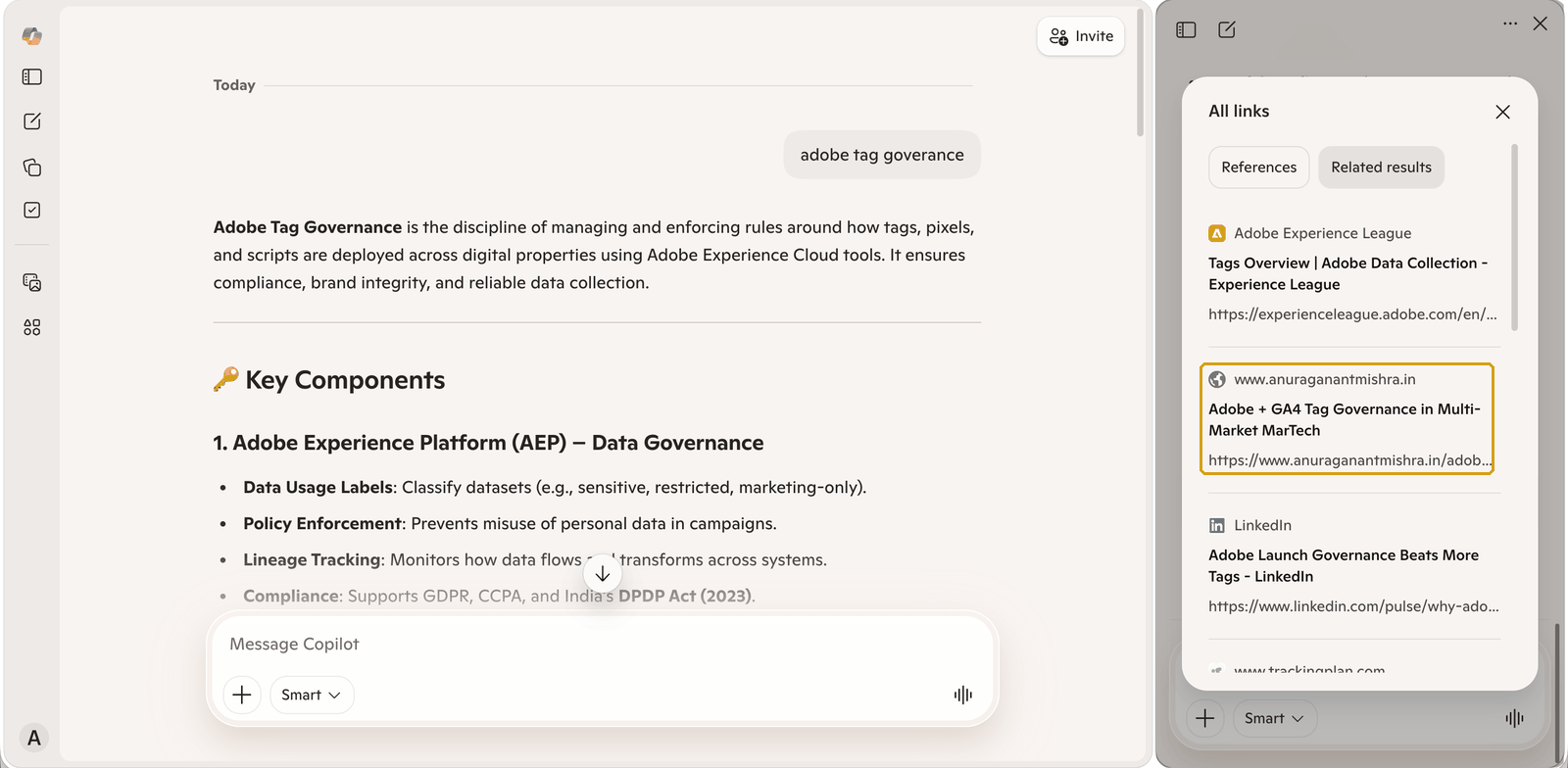
Knowing the difference matters, because only one of these is likely to register in the reports above. If you only ever look at your citation count, the second kind of visibility is invisible to you.
What these tools don't tell you
Three gaps are worth knowing about before you go hunting for data that isn't there.
You can't separate your own testing from real usage. This is the limitation that bothers me most. I have three recorded citations, all attributed to my home page. I also spent that period searching for my own site and my own name while testing whether any of this was working. Were those citations real users, or me? If you are going to test your own visibility, keep a log of what you searched and when, or your own experiments will quietly contaminate your data.
Clarity gets you part of the way to an answer, and this is the single most useful thing I found in any of these dashboards. Its Share of Authority panel splits your citations by query type — and mine shows 100% of my citations came from branded queries. Queries containing my name or my domain.
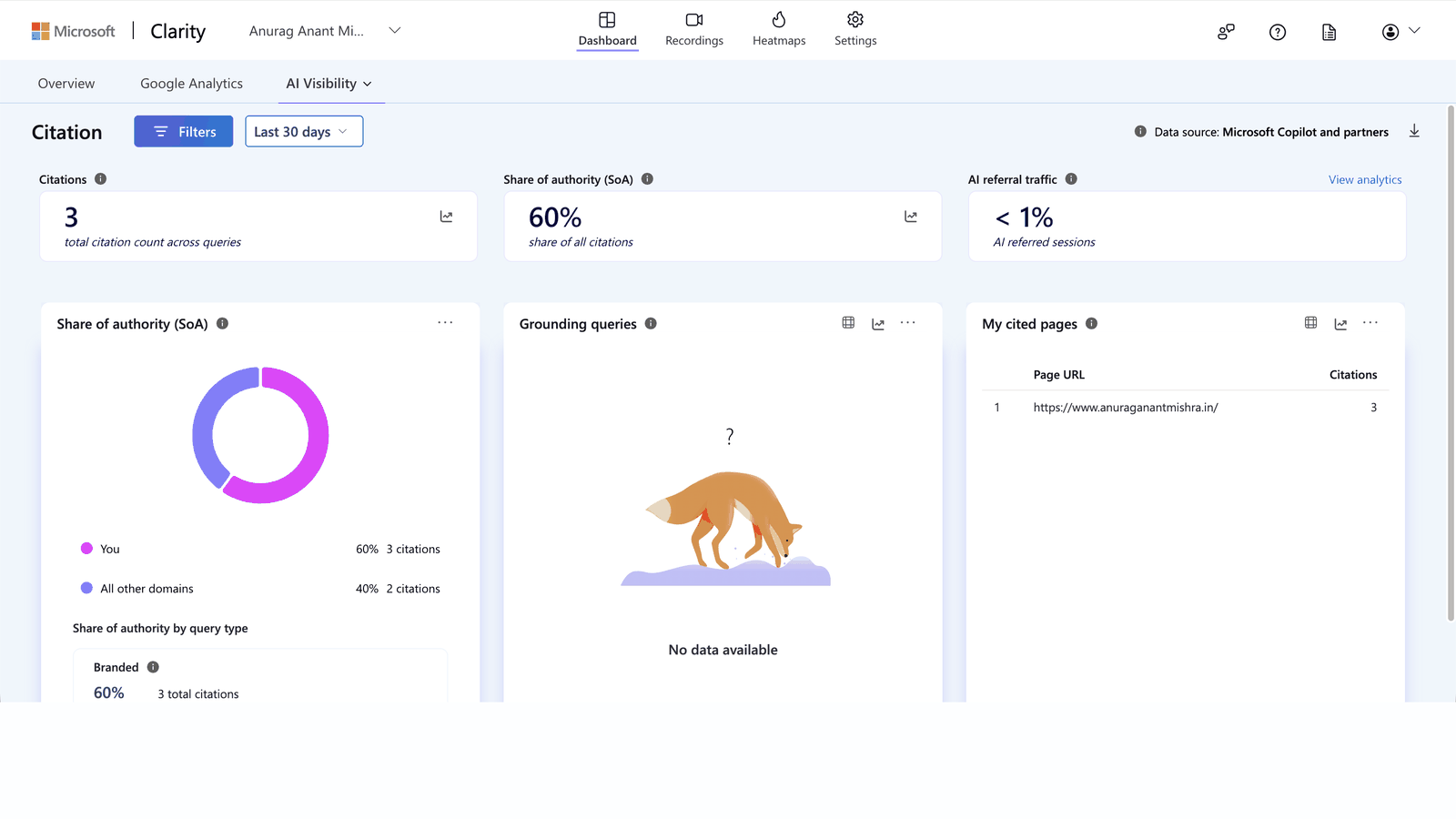
That reframes the whole number. Three citations sounds like progress until you see they were all branded — which means nobody discovered me through those. They already knew my name, or they were me, testing. Real AI visibility is the non-branded share: people asking about a topic and finding you because you were the best answer. If your branded share is 100%, you have not started yet.
This is the metric I would watch above all the others, and it is the reason I would not drop Clarity even though its citation count duplicates Bing Webmaster Tools.
Grounding queries can be completely empty. Bing Webmaster Tools has a grounding queries view — in theory, the actual questions that pulled in your content. In three months, mine has shown "No data available" throughout, even while citations were recorded. The report notes the data is a sample that may be refined as more is processed. Worth knowing before you build a workflow around a view that may never populate.
Search Console doesn't show you the queries at all. The Generative AI features report gives you pages, countries and devices — but not what people asked. On that dimension Bing offers more, at least in principle. In practice, page-level reporting is the signal you can actually depend on in both tools.
The check that fooled me
Here is a mistake I made, so you don't have to. I used a site: search on Bing to check how many of my pages were indexed. It returned two results. Meanwhile Bing Webmaster Tools was telling me a specific article was "Indexed successfully."
Bing Webmaster Tools was right. A site: search is not a real index check — it returns a sample of what the engine chooses to surface, not a complete count. Use URL Inspection in Bing Webmaster Tools. If it says indexed, it is indexed, no matter what a site: search shows you.
So what should you actually do?
My honest order of operations, based on doing this the slow way:
Have patience. This is the first thing, not an afterthought. Indexing takes time, citations take longer, and the gap between the two engines can be weeks.
Get the SEO foundation right first. It is non-negotiable. Clean rendering, crawl access, indexing across search engines. Without that, nothing downstream can happen.
Then add the AEO layer. Structured data, clear question-shaped headings, schema that describes what the page actually is.
And finally — content is the thing that decides it. Write for humans, not for crawlers. Answer real questions directly. And if you can tie in a real example or a story from your own work, that is the version that gets picked up. In my own data, the most specific and practical article is the one pulling the most impressions. Generic content optimised heavily still loses to specific content written honestly.
I write about MarTech architecture, analytics governance, and privacy-first measurement. You may also find my pieces on making your site visible to AI crawlers and Consent Mode v2 useful. More of my work is on the home page.